Cricbuzz11
Updated
Current Version
2.0.3
Offered By

With your passion for Cricbuzz11, you shouldn’t have to limit yourself to the small screen of a phone. Play like a pro and take full control of the game using a keyboard and mouse. MEmu gives you everything you’re looking for. Download and play Cricbuzz11 on PC. Play as long as you want — no more worries about battery life, mobile data, or unexpected calls. The all-new MEmu 9 is the best way to play Cricbuzz11 on PC. With our expertly designed keymapping system, Cricbuzz11 feels just like a real PC game. The MEmu multi-instance manager lets you run two or more accounts on the same device at the same time. Most importantly, our exclusive emulation engine unlocks your PC’s full potential, delivering smooth and seamless performance.
Show more
Download Cricbuzz11 on PC with MEmu Android Emulator. Enjoy playing on big screen. India's most trusted cricket app Cricbuzz brings you Cricbuzz11, an all-new fantasy cricket app!

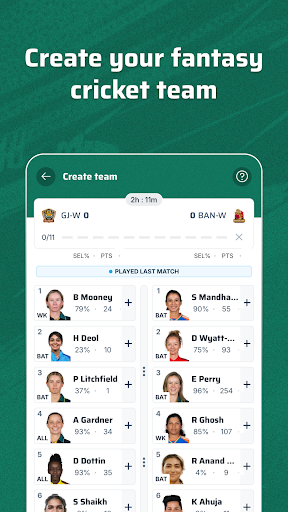
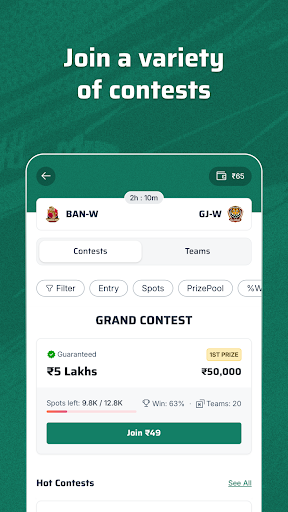
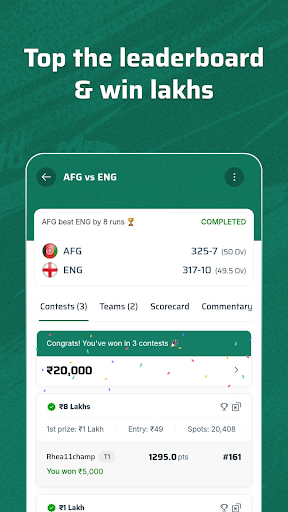
India's most trusted cricket app Cricbuzz brings you Cricbuzz11, an all-new fantasy cricket app!
Cricket fans are welcome to make their fantasy cricket teams and compete in different contests on the app to win big prizes.
What is Fantasy Cricket?
Fantasy cricket is an interactive and strategic online game where players strategically assemble virtual teams of real cricketers to compete against each other based on their performances in actual matches. Points are awarded based on the actual performance of selected players in real matches in the fantasy cricket contest. By leveraging cricket expertise and analysis, users can strategically select players from the starting lineup, accumulate points, and aim for victory in Fantasy Cricket.
Join the Action on the Cricbuzz11 Fantasy Cricket App
- Play Fantasy Cricket for the upcoming cricket tournaments
- Play Fantasy Cricket & Win Big in contests
- Play Fantasy Cricket for International & Domestic Matches
How to Play Fantasy Cricket Matches on Cricbuzz11?
- Create your fantasy team by choosing real players from the match
- Compete in paid contests & win big
- Watch your chosen players earn points based on real-life performance
Why Choose Cricbuzz11?
- From the house of India's most trusted cricket app
- Seamless fantasy cricket team creation experience
- Mega contests with big cash prizes
- Wide range of contests available
- Winning in lakhs
- Practice contests to play for free
- Beginner's guide for new players
- Secure Withdrawals & Deposit
Cricbuzz11 App Offers Exclusive Features That You'll Love
- Flexible team creation: Pick players from both teams with no restrictions on the number of player selected per category
- Single-screen team creation: Select players seamlessly from a single screen and join contests faster
- Wide variety of fantasy cricket contests to choose from
What's Unique About the Cricbuzz11 Fantasy Cricket App?
Reliability: Cricbuzz11 fantasy cricket app the most trusted name in Fantasy Sports. It comes from the house of Cricbuzz, which is the most trusted cricket app in the country.
Easy Withdrawals & Deposits: Play fantasy cricket securely with quick withdrawals and deposits.
Help & Support: Have an issue? We will resolve it for you! Cricbuzz11’s 'Write to us' option provides solution-based FAQs & prompt assistance.
Play Responsibly with Cricbuzz11
We deeply care about our user's safety. Therefore, we strive each and every day to make their fantasy cricket experience safe with utmost transparency and trust. Cricbuzz11’s Responsible Play policy is our stringent endeavor toward safeguarding our users. For further assistance, contact us via: https://fantasy.cricbuzz11.com/help-and-support?source=website. For more information about 'Responsible Play', visit https://fantasy.cricbuzz11.com/responsible-play?source=website
Get the Cricbuzz11 Fantasy Cricket app now and start winning big!
Show more

1. Download MEmu installer and finish the setup

2. Start MEmu then open Google Play on the desktop

3. Search Cricbuzz11 in Google Play
Install
4. Download and Install Cricbuzz11
5. On install completion click the icon to start

6. Enjoy playing Cricbuzz11 on PC with MEmu
MEmu Play is the best Android emulator and 100 million people already enjoy its superb Android gaming experience. The MEmu virtualization technology empowers you to play thousands of Android games smoothly on your PC, even the most graphic-intensive ones.
Bigger screen with better graphics; Long duration, without limitation of battery or mobile data.
Full Keymapping support for precise control of keyboard and mouse or gamepad.
Multiple game accounts or tasks on single PC at one time with Multi-Instance manager.
Play Cricbuzz11 on PC by following steps:






















































![PUBG mobile update [Mar.2020] PC](https://www.memuplay.com/blog/wp-content/uploads/2019/11/121-1.jpg)