Machina Waking
Updated
Current Version
1.5
Offered By

With your passion for Machina Waking, you shouldn’t have to limit yourself to the small screen of a phone. Play like a pro and take full control of the game using a keyboard and mouse. MEmu gives you everything you’re looking for. Download and play Machina Waking on PC. Play as long as you want — no more worries about battery life, mobile data, or unexpected calls. The all-new MEmu 9 is the best way to play Machina Waking on PC. With our expertly designed keymapping system, Machina Waking feels just like a real PC game. The MEmu multi-instance manager lets you run two or more accounts on the same device at the same time. Most importantly, our exclusive emulation engine unlocks your PC’s full potential, delivering smooth and seamless performance.
Show more
Download Machina Waking on PC with MEmu Android Emulator. Enjoy playing on big screen. The first major update of Machina Waking is now live!



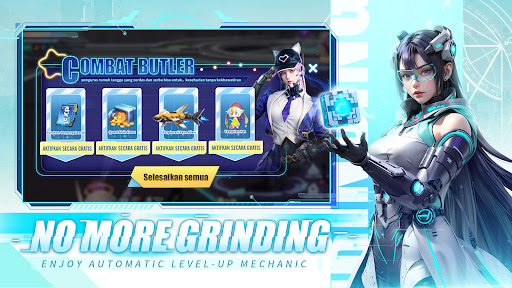
The first major update of Machina Waking is now live! New systems and gameplay features are fully unlocked, taking your otherworldly adventure to the next level!
▣ Elevate Your Otherworldly Adventure! ▣
Dear Resonators, the first major update of Machina Waking has arrived! A brand-new ultra-large raid, the Star Sea Domination gameplay, and numerous new systems are now available. More exciting content awaits your exploration! Log in now to unlock new powers and experience the infinite charm of an otherworldly civilization!
▶ Sneak Peek: New Systems and Gameplay Fully Unlocked!
Relic System and Relic Treasure Hunt: Unlock mysterious powers.
Star Sea Expedition and Alliance: Embark on alliance domination.
Celestial Wing Armor: Activate legendary battlefield prowess.
Dragon Soul System: Awaken ancient powers.
Other new gameplay features like the Dojo of Apocalypse, Trials of the War God, Divine Throne Assist, and Equipment Star Forging will help you break through power limits and achieve legendary status!
Play Machina Waking now to experience new content and embark on your otherworldly adventure!
▣ Game Features ▣
▶ Massive Rewards: play to claim 1,000,000,000 Diamonds instantly
Get ready to receive 1,000,000,000 Diamonds and other rich rewards like mounts, supreme pets, and headgear for 7 days! These rewards will help you push through the challenges of your epic adventure!
▶ Smart Assistant: enjoy simple upgrade mechanics
The Smart Assistant is here to help you out! It allows you to complete daily quests and upgrade your characters with only a tap on the screen. No need to worry about falling behind while you're busy!
▶ Rumble with Thousands: dominate the battlefield
Join cross-server PVP battles and team up with other players to snatch valuable resources on the battlefield. Strategy, bravery, and teamwork are keys to victory. In this epic showdown, only the strongest can become the ruler.
▶ Rich PVE Content: enjoy the thrill of exploring
Dive into abundant PVE content with 50+ maps, 100+ boss battles, and 150+ dungeon levels. No true explorers can resist the fun of defeating bosses with unique battle mechanics and harvesting tons of loot.
▶ Ultra-Realistic Evolution: your most loyal companion
Over 50 different battle pets await your summons. Breed them and evolve them to their ultimate form. They are the most loyal partners to fight with and the best companions to travel with.
Join us now, Resonators. Together, we will unleash the power of the Machina!
Show more

1. Download MEmu installer and finish the setup

2. Start MEmu then open Google Play on the desktop

3. Search Machina Waking in Google Play
Install
4. Download and Install Machina Waking
5. On install completion click the icon to start

6. Enjoy playing Machina Waking on PC with MEmu
MEmu Play is the best Android emulator and 100 million people already enjoy its superb Android gaming experience. The MEmu virtualization technology empowers you to play thousands of Android games smoothly on your PC, even the most graphic-intensive ones.
Bigger screen with better graphics; Long duration, without limitation of battery or mobile data.
Full Keymapping support for precise control of keyboard and mouse or gamepad.
Multiple game accounts or tasks on single PC at one time with Multi-Instance manager.
Play Machina Waking on PC by following steps:


































































![PUBG mobile update [Mar.2020] PC](https://www.memuplay.com/blog/wp-content/uploads/2019/11/121-1.jpg)