Lumi by Nextcare
Dikemas kini
Versi Semasa
6.4.17
Ditawarkan Oleh

Berhentilah bimbang dengan bayaran berlebihan semasa menggunakan Lumi by Nextcare di telefon bimbit anda, bebaskan diri anda dari layar kecil dan nikmati penggunaan aplikasi pada paparan yang jauh lebih besar. Mulai sekarang, dapatkan pengalaman skrin penuh aplikasi anda dengan papan kekunci dan tetikus. MEmu Play semua ciri mengejutkan yang anda harapkan: pemasangan cepat dan penyediaan mudah, kawalan intuitif, tidak ada batasan bateri, data mudah alih, dan panggilan yang mengganggu. MEmu 9 yang baru adalah pilihan terbaik untuk menggunakan Lumi by Nextcare di komputer anda. Dikodkan dengan penyerapan kami, pengurus multi-instance menjadikan pembukaan 2 atau lebih akaun pada masa yang sama mungkin. Dan yang paling penting, mesin emulasi eksklusif kami dapat melepaskan potensi penuh PC anda, menjadikan semuanya lancar dan menyeronokkan.
Tunjukkan Lagi
Download Lumi by Nextcare on PC with MEmu Android Emulator. Enjoy playing on big screen. Whether you’re a new or existing Nextcare insured member, Lumi is here to simplify your health.
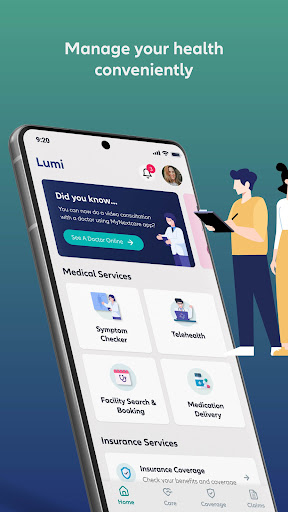
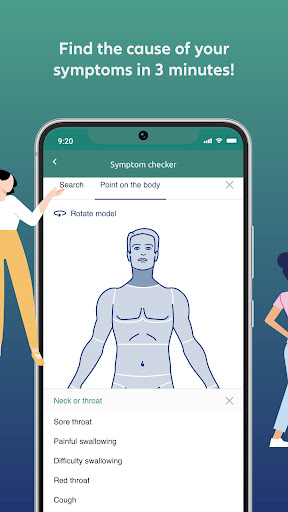
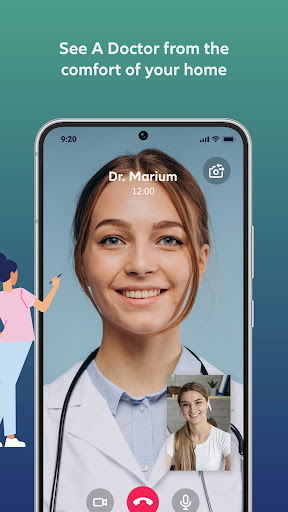
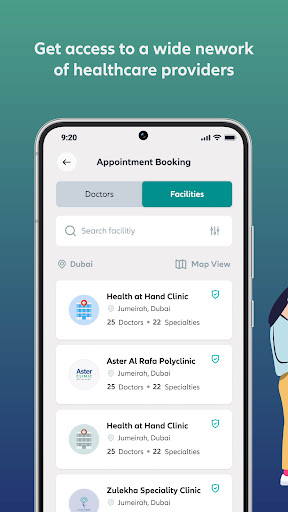
Whether you’re a new or existing Nextcare insured member, Lumi is here to simplify your health. Access a range of features in one convenient app, including submitting and tracking claims, knowing your policy benefits, generating insurance certificates, and downloading your digital health insurance card.
With Lumi, you’ll also have access to a variety of digital health services that are simple to use, fast and easy to navigate, and designed to make life easier for you and your family.
Take charge of your health through features such as:
Check Your Symptoms
You can access an AI-powered symptom checker that identifies potential health concerns in 3 minutes and reduces unnecessary visits to the doctor. A great tool for identifying emergency conditions early on.
Consult A Doctor Online
You can now engage in a telehealth service with a highly qualified team of doctors who can diagnose, treat, and manage non-emergency conditions from the comfort of your home. Connect with multilingual doctors through a video call who have years of telehealth experience. in diagnosing, treating and managing non-emergency conditions. You can also get professional medical advice from expert doctors through live chat using our Dr. Chat service. You can simply send your health-related questions via chat. Dr. Chat’s AI bot will receive and analyse the queries using advanced NLP techniques to identify the required medical service. Based on the analysis, the AI bot will promptly connect you with the most suitable doctor for a live chat advice.
A distinctive feature that also offers you the convenience of having prescription medication delivered to your doorstep. This service is not only available to patients who have had an online teleconsultation, but also to those with health condition management who can easily have their prescriptions refilled.
Find A Healthcare Provider And Book An Appointment
You can also easily find healthcare providers and book doctor appointments by accessing the largest most extensive healthcare provider network. A useful service to easily locate and contact hospitals, clinics, pharmacies, labs, or any medical facility you may need, and to searching for over 20,000 doctors based on specialty, language, availability, location, and rating. And that’s not all: the service allows you to get pre-approval and a quote for your appointment, making the booking process seamless.
Submit & Track Medical Claims
You can now experience an advanced claims management technology allows you to track your claims and receive claims’ reimbursement through your desired payment method by simply uploading medical documents.
Chat With Our Virtual Assistant
Do you have any questions or need support? Access immediate health support whenever you need it, wherever you are by chatting with our friendly virtual assistant, Zoe, for quick solutions to your health queries. Zoe is here to help you find medical providers and facilities in your area that are covered under your insurance network, give instant feedback on the status of your claims and offers solutions or connect you to our care center team for inquiries related to your policy.
Lumi is all about simplicity, speed, and convenience.
Simple to use
Get instant access to the most important insurance features to get the best out of your policy.
Fast & easy app experience
From coverage and benefits to submitting claims, manage your health quickly and easily.
Seamless health services
Gain access to your healthcare services anytime, anywhere.
About Lumi
Lumi is designed to make your health journey easier for you. It combines an array of digital health services in one single app. Our team of health professionals create the most efficient tools and services via decades of expertise to help you manage your health.
Download Lumi now and experience a seamless health journey like never before.
Tunjukkan Lagi

1. Muat turun pemasang MEmu dan selesaikan persediaan

2. Mulakan MEnu kemudian buka Google Play di desktop

3. Cari Lumi by Nextcare di Google Play
Install
4. Muat turun dan Pasang Lumi by Nextcare
5. Apabila selesai pemasangan, menekan ikon itu untuk memulakan

6. Gunakan MENu untuk mengalami Lumi by Nextcare pada komputer anda
MEmu Play ialah emulator Android terbaik, dengan lebih 100 juta pengguna mengalami pengalaman aplikasi Android yang unggul. Teknologi virtualisasi MEmu membolehkan anda menjalankan beribu-ribu aplikasi Android dengan lancar pada komputer anda, walaupun yang paling mencabar.
Skrin lebih besar dengan grafik yang lebih baik; Tempoh yang panjang, tanpa had bateri atau data mudah alih.
Sokongan Keymapping penuh untuk kawalan tepat papan kekunci dan tetikus atau gamepad.
Pelbagai akaun permainan atau tugas pada satu PC sekaligus dengan pengurus pelbagai contoh.
Use Lumi by Nextcare on PC by following steps: